 FixMyMesh
Your Blender asset, checked in the real engines before you ship it.
FixMyMesh imports your .blend into the Unreal, Unity and Godot installed on your PC, in the background. For each engine, a three-word answer: arrives identical, arrives with settings to set, or visible loss. You come away with the import sheet, the ready-to-apply settings file and the deliverable exported exactly as it was tested.
Windows 10 and 11 · 3 free tests at launch, no credit card

Perfect in Blender. Broken at the client.
The export never complains. The problem shows up later, in somebody else’s engine.
The asset arrives wrong
Lying on its side, a hundred times too big, faceted, missing its textures. And your client is the one who finds out.
The back and forth
A message, a fix, a new upload, more waiting. Every round costs a day and a little trust.
Checking by hand
Open each engine, import, look, start again for every asset and every version. Nobody has that time.
Three steps to a clear answer.
- 1
Drop your file
One
.blend, or a whole folder. Tick the engines you deliver to. - 2
It gets imported for real
Every engine installed on your PC imports the asset, in the background, with no window. FixMyMesh compares what it received with your source.
- 3
Ship with confidence
A clear three-word answer per engine. You come away with the import sheet, the settings file and the deliverable exported as tested, ready to hand to your studio. Safe repairs go on a copy, and you confirm each one.
The real engines. Not a simulation.
A validator reads your scene and guesses the outcome. FixMyMesh runs the import in Unreal, Unity and Godot, and measures what each engine actually received.

- Blender
- Unreal
- Unity
- Godot
Unreal 5.8, 5.7, 5.6 · Unity 6.3, 6.0 LTS · Godot 4.7, 4.6 · from Blender 5.2, 4.5 LTS
See what each engine received.
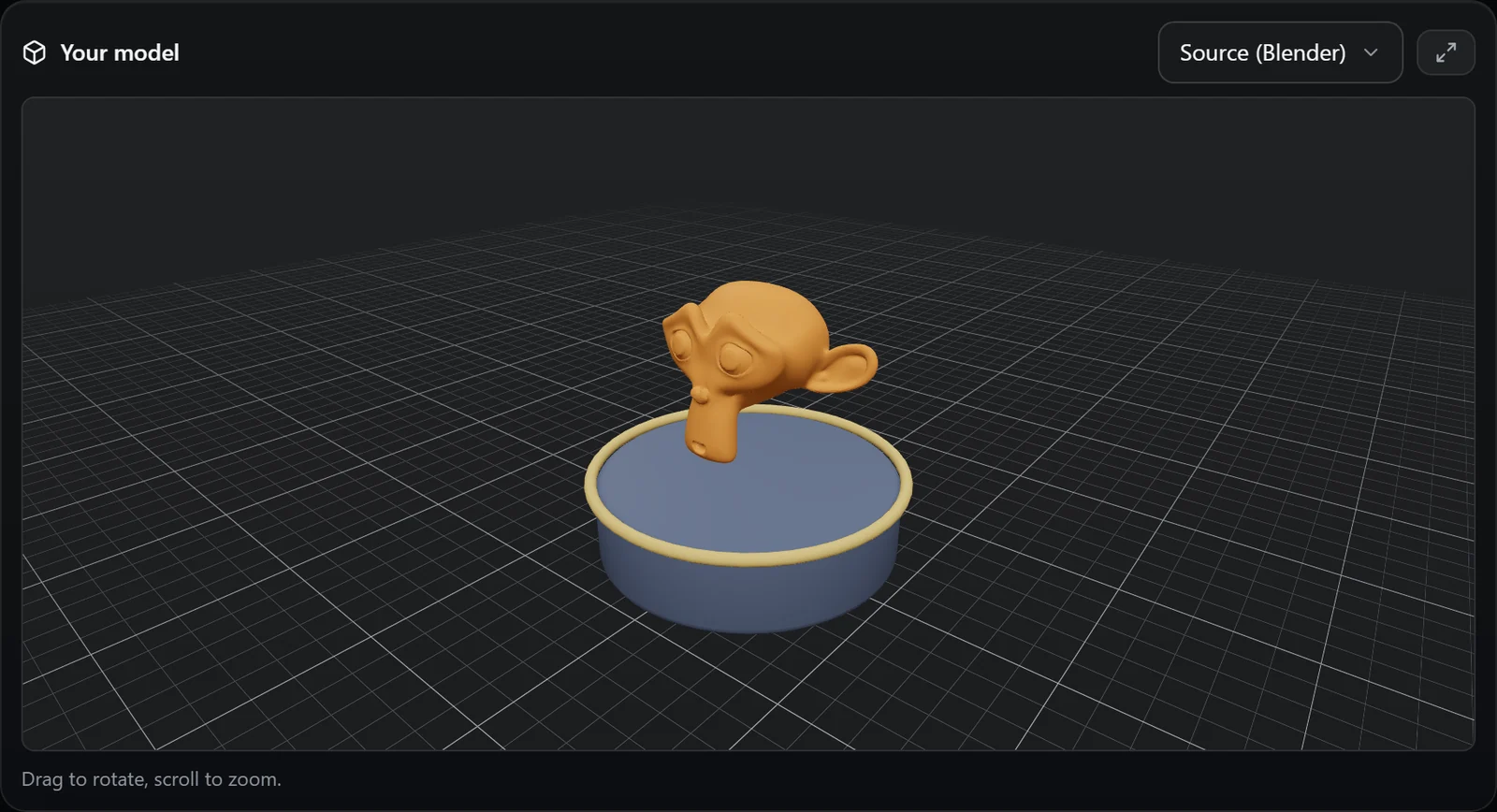
The result screen opens with your model in 3D. Switch from the source to the model as each engine received it, and spot the difference at a glance.
- The Blender source and every engine in the same viewer, full screen when you need it.
- The Show button on a problem frames and highlights the objects it is about.
- After Auto-Fix, the original and the repaired copy side by side, under the same camera.
What broke, why, and what to do.
No log to decode: for each engine, what changed, the likely cause and the fix. And it tells you what it did not check, so nothing is passed off as fine.
Compared in every engine: geometry, scale, normals, UVs, materials and textures, plus the number of collision shapes and LODs. Anything FixMyMesh cannot check from the data is marked Visual check, for you to look at.
Export the measurement report as a single HTML file: the dated list of what was measured, to attach to your delivery and show your client. See a sample report
Normals · Unreal 5.8
Measured gap- What changed
- Smooth shading became faceted.
- Likely cause
- The importer recomputed the normals.
- Fix
- Pick Import Normals and Tangents in Unreal, then retest.
Example
Safe repairs you approve. Then it retests.
FixMyMesh applies safe repairs to a copy, never your original, and retests it in the same engines. Each repair is yours to confirm. The retest tells you, engine by engine, what is settled. When the cause is the format or the engine, it gives the way out: deliver as glTF.

One click
Safe fixes, such as an unapplied rotation, applied together. Rolled back if they make the result worse.
With your approval
Fixes that change how your model is built, such as applying scale, wait until you tick them.
Your call
Engine settings stay yours: the report names the one to change.
After Auto-Fix: original and repaired copy, side by side
Once you keep the Auto-Fix, the viewer shows the original and the repaired copy side by side, with the changed objects highlighted. The retest says, engine by engine, what is fixed and what is left.
Deliver with the import sheet prepared with FixMyMesh.
One click exports the deliverable exactly as it was tested, with what it takes to set it up first time at your recipient.
The import sheet prepared with FixMyMesh: the dated list of measured settings, ready to pass to your studio.
The import settings file for Unreal and Unity, ready to apply: the studio has nothing to guess.
The tested deliverable: the file you send is the one the engines really imported.
Compare the pictures, not just the numbers.
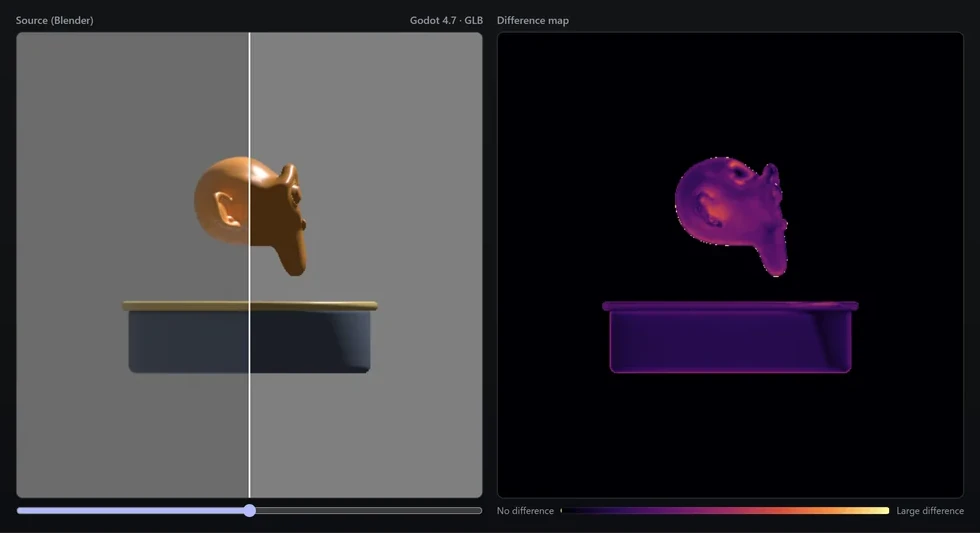
As an option, FixMyMesh renders the source and each engine under the same conditions. A slider sweeps from one to the other, and a difference map shows where the picture changes.
This comparison is off by default: it is the only check that uses the graphics card. For Unreal, it covers the silhouette and the structure.
Is the whole pack ready to ship?
You sell assets in packs: test them in packs. Drop a folder of .blend files: every asset is tested in every engine you pick, and one failing asset never stops the others.
One line at the top: how many assets are ready to deliver, out of how many.
The whole batch in one pass: for each asset, a three-word answer per engine (identical, settings to set, visible loss), most urgent first. Click a row for the full detail.
Sort by worst status to know where to start.
Need the folder report as a single HTML file, or to fix the whole folder at once? That is the command line, included in both licenses. In the application, Auto-Fix runs asset by asset.
Measured on 44 real CC0 assets
Coming soon. We are importing 44 well-known CC0 assets into Unreal, Unity and Godot and will publish here what arrives, asset by asset.
While it tests, you keep working.
No window
The engines run hidden and never take the focus. Import and rendering run at reduced priority, so your PC stays usable.
You know where it stands
Progress is shown per asset and per engine, with the elapsed time. If nothing moves for several minutes, the screen says so and offers to stop.
Even on a busy PC
If Unity or Unreal is slow to start, it is tried once more, on its own. If it still fails, the report says so in one sentence and asks you to run the test again.
Fair questions before you buy
“I already know how to export.”
Exporting is only half the trip. Unreal may recompute your normals, Godot compresses them, a scale can change by a factor of 100. What counts is what the engine receives: FixMyMesh measures it.
“I don’t have the time.”
The test runs on its own, in the background, while you work. How long it takes depends on the engines you pick and on your machine, and an asset already tested and unchanged is retested in seconds, from the cache. And instead of opening three engines, you look only at the points marked Visual check.
“What does it cost?”
One payment, no subscription, every 1.x version included. One failed delivery often costs more. And you try it first: 3 free tests on your own files.
“What about my files?”
Everything stays on your machine: your assets are never sent online. Your original is never modified, fixes go to a copy.
Try it on your own files.
- Runs on your Windows PC. Nothing is sent online.
- Uses the engines you already have installed, and runs them in the background.
- Its core is written in Rust: it reads a mesh in the blink of an eye, and only the engines take their time.
- 3 free tests at launch, no credit card. A folder of up to 10 assets counts as one test.
- No subscription. Pay once, every 1.x version included. Each update adds checks: points marked Visual check can turn green with nothing to change on your side.
Individual
For one artist. Perpetual license, every 1.x version included.
Get notified at launch14-day money-back guarantee
Studio
For a team of up to 5. Every feature of Individual, perpetual license, every 1.x version included.
Get notified at launch14-day money-back guarantee
Need more users? Ask us
Automate your quality checks.
The fixmymesh command tests and repairs folders of assets, writes HTML and JSON reports and fits into your scripts or your build pipeline.
Included in the Individual and Studio licenses.
Options, exit codes and license rule: see the documentation.
Test a whole pack, results as JSON
fixmymesh test "C:\Assets\Weapon Pack" --recursive --json > run.jsonFix every asset of the pack on a copy, safe fixes only, then retest
fixmymesh repair "C:\Assets\Weapon Pack" --recursive --safe-only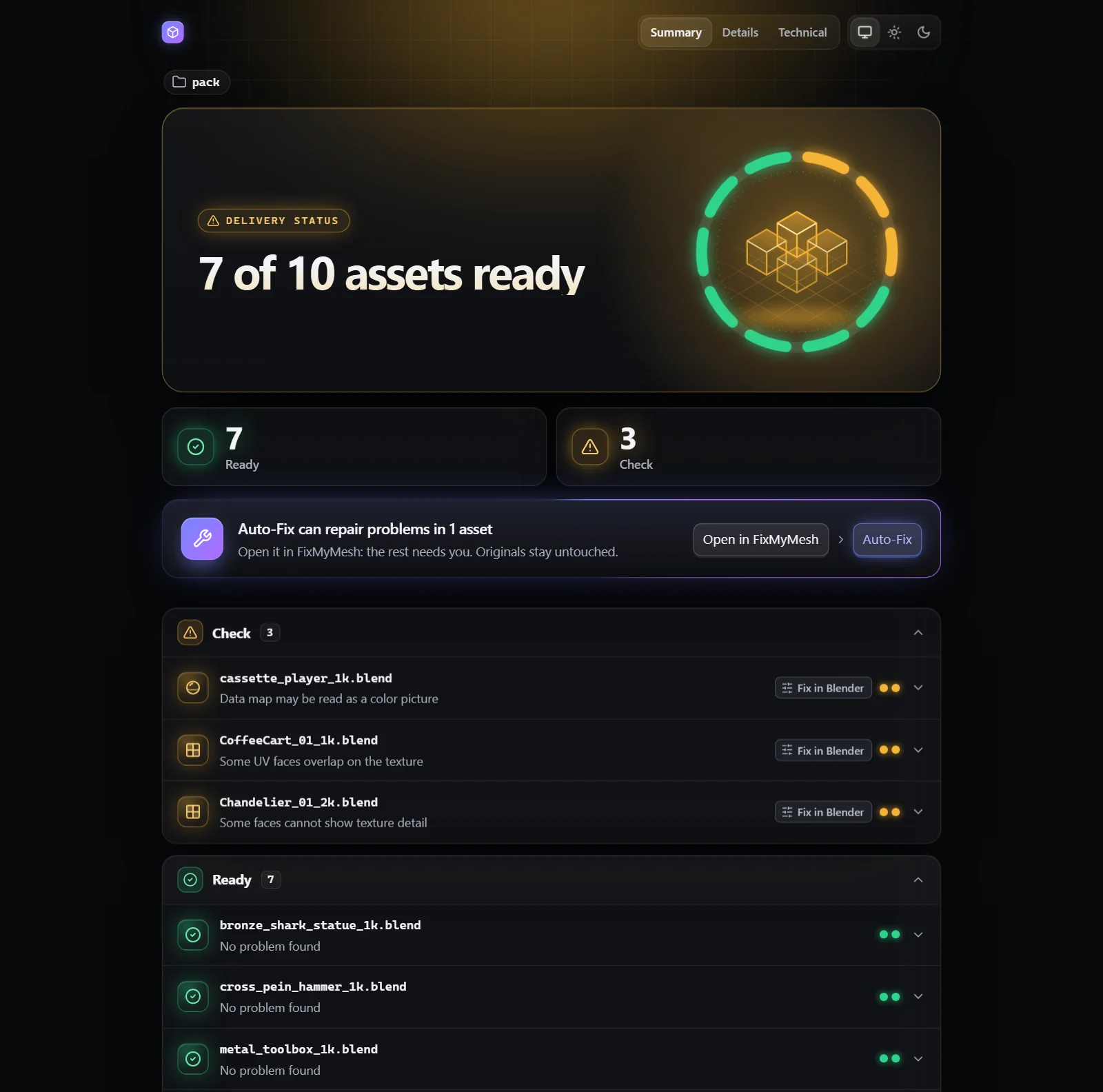
fixmymesh report --lot), unedited: ten free CC0 assets as published, tested for Godot 4.7 (GLB) and Unreal 5.8 (glTF).Don’t let your client run the compatibility test for you.
Try it for free. Buy once.